Đi hết hướng dẫn này, bạn sẽ có một MCP server viết bằng Python chạy trên SDK v2.0, cung cấp công cụ lấy dữ liệu thời tiết thực tế từ Cơ quan Thời tiết Quốc gia Mỹ (NWS) và nối thẳng được vào Claude Desktop.
Trước khi bắt đầu, bạn cần Python 3.10 trở lên, công cụ quản lý dự án uv để dựng môi trường ảo và
ứng dụng Claude Desktop trên macOS hoặc Windows.
Bước 1 — Tạo dự án và cài MCP Python SDK
Dùng uv để khởi tạo dự án và cô lập môi trường ảo.
Trên macOS/Linux:
uv init weather
cd weather

uv venv
source .venv/bin/activate

uv add "mcp[cli]"

touch weather.py
Trên Windows:
uv init weather
cd weather

uv venv
.venv\Scripts\activate

uv add "mcp[cli]"

new-item weather.py
Lệnh trên phải kéo về mcp phiên bản 2.x. SDK v2 đổi sang dùng httpx2 và không còn cài httpx
nữa, nên đoạn mã ở Nhánh 1 bên dưới import httpx2; nếu bạn quen viết import httpx theo thói cũ,
Python sẽ báo ModuleNotFoundError.
Bước 2 — Viết máy chủ MCP đầu tiên với một công cụ
SDK v2.0 mang bản giao thức stateless 2026-07-28: bỏ handshake khởi tạo, không giữ session, nên mở rộng nhẹ hơn hẳn. Server vẫn nói được bản cũ, nên tuỳ client mà một phiên có thể thương lượng xuống giao thức 2025-11-25.
Có hai nhánh; chọn nhánh phù hợp với dự án và bỏ qua nhánh còn lại.
Nhánh 1: Dùng SDK chính thức
Mở weather.py và viết server kèm một công cụ lấy dự báo thời tiết.
import logging
from typing import Annotated, Any

import httpx2
from mcp.server import MCPServer
from pydantic import Field

# Ghi log ra stderr. Không dùng print(), vì stdout dành riêng cho JSON-RPC.
logging.basicConfig(level=logging.INFO)
logger = logging.getLogger("weather-server")

mcp = MCPServer("weather")

NWS_API_BASE = "https://api.weather.gov"
USER_AGENT = "weather-app/1.0"


async def make_nws_request(url: str) -> dict[str, Any] | None:
    """Gửi yêu cầu tới API của NWS."""
    headers = {"User-Agent": USER_AGENT, "Accept": "application/geo+json"}
    async with httpx2.AsyncClient() as client:
        try:
            response = await client.get(url, headers=headers, timeout=30.0)
            response.raise_for_status()
            return response.json()
        except Exception as e:
            logger.error(f"Lỗi API: {e}")
            return None


@mcp.tool()
async def get_forecast(
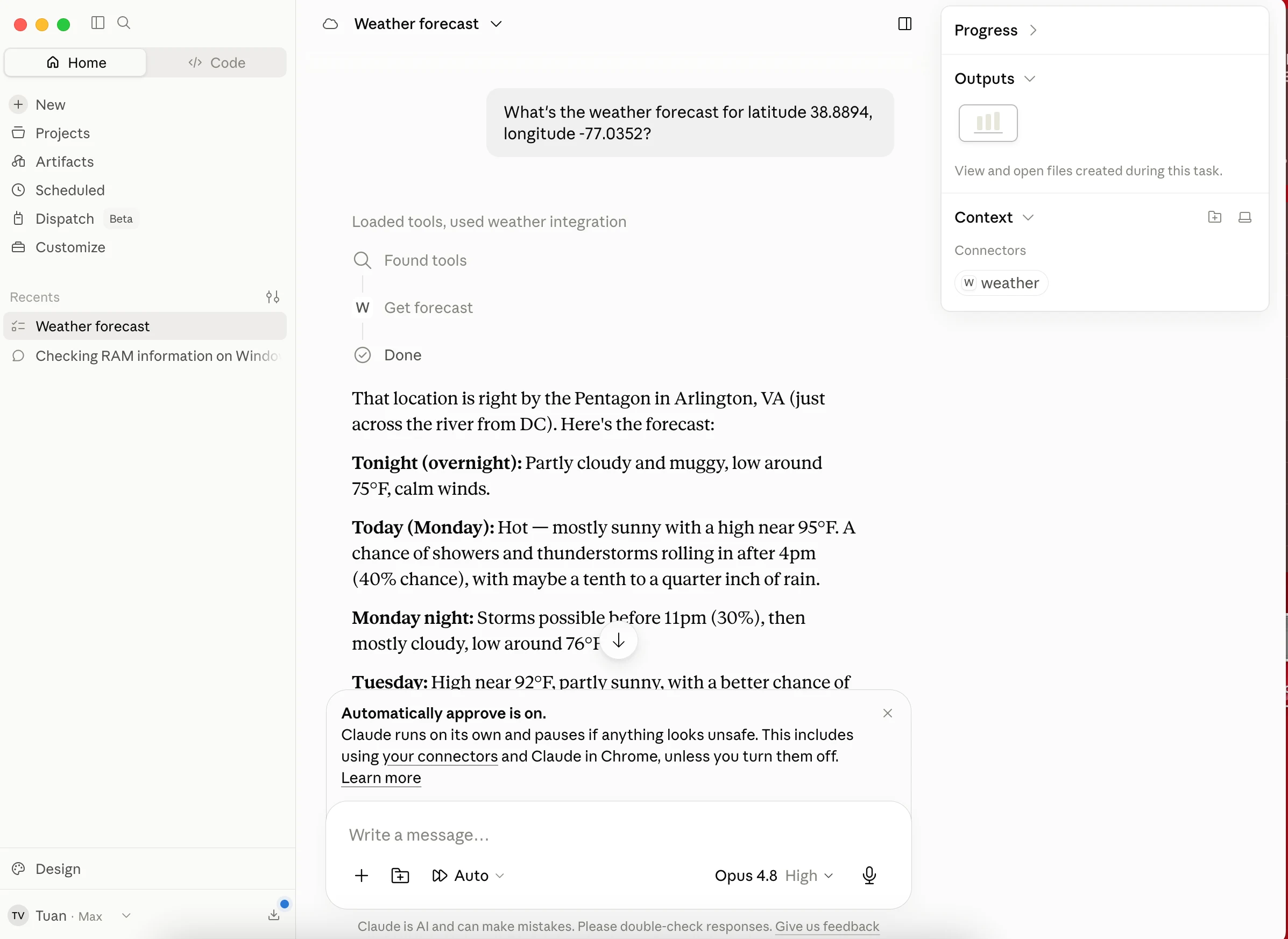
    latitude: Annotated[float, Field(description="Vĩ độ của vị trí, ví dụ 38.8894")],
    longitude: Annotated[float, Field(description="Kinh độ của vị trí, ví dụ -77.0352")],
) -> str:
    """Lấy dự báo thời tiết chi tiết cho một tọa độ tại Mỹ."""
    points_url = f"{NWS_API_BASE}/points/{latitude},{longitude}"
    points_data = await make_nws_request(points_url)

    if not points_data:
        return "Lỗi: không lấy được dữ liệu grid point cho vị trí này."

    forecast_url = points_data["properties"]["forecast"]
    forecast_data = await make_nws_request(forecast_url)

    if not forecast_data:
        return "Lỗi: không truy xuất được dự báo chi tiết."

    periods = forecast_data["properties"]["periods"]
    forecasts = [
        f"{p['name']}: {p['temperature']}°{p['temperatureUnit']}, {p['detailedForecast']}"
        for p in periods[:5]
    ]
    return "\n---\n".join(forecasts)


if __name__ == "__main__":
    mcp.run(transport="stdio")
Nhánh 2: Dùng framework FastMCP
FastMCP là dự án riêng, không nằm trong SDK chính thức, nên hãy dựng cho nó một dự án mới hoàn toàn:
uv add fastmcpĐừng cài fastmcp chung với mcp[cli] trong cùng một dự án. FastMCP 3.x ghim mcp<2.0, nên nó
kéo SDK chính thức tụt về 1.x và toàn bộ mã ở Nhánh 1 gãy ngay từ dòng import.
Cái ghim đó kéo theo một hệ quả nữa: nhánh này chạy mcp 1.x, vốn đi kèm httpx chứ không phải
httpx2. Dòng import bên dưới vì thế ngược với Nhánh 1 — viết import httpx2 ở đây sẽ báo
ModuleNotFoundError.
import logging
from typing import Annotated, Any

import httpx
from fastmcp import FastMCP
from pydantic import Field

logging.basicConfig(level=logging.INFO)
logger = logging.getLogger("weather-fast")

mcp = FastMCP("weather-fast")

NWS_API_BASE = "https://api.weather.gov"
USER_AGENT = "weather-app/1.0"


async def make_nws_request(url: str) -> dict[str, Any] | None:
    """Gửi yêu cầu tới API của NWS."""
    headers = {"User-Agent": USER_AGENT, "Accept": "application/geo+json"}
    async with httpx.AsyncClient() as client:
        try:
            response = await client.get(url, headers=headers, timeout=30.0)
            response.raise_for_status()
            return response.json()
        except Exception as e:
            logger.error(f"Lỗi API: {e}")
            return None


@mcp.tool
async def get_forecast(
    latitude: Annotated[float, Field(description="Vĩ độ của vị trí, ví dụ 38.8894")],
    longitude: Annotated[float, Field(description="Kinh độ của vị trí, ví dụ -77.0352")],
) -> str:
    """Lấy dự báo thời tiết chi tiết cho một tọa độ tại Mỹ."""
    points_url = f"{NWS_API_BASE}/points/{latitude},{longitude}"
    points_data = await make_nws_request(points_url)

    if not points_data:
        return "Lỗi: không lấy được dữ liệu grid point cho vị trí này."

    forecast_url = points_data["properties"]["forecast"]
    forecast_data = await make_nws_request(forecast_url)

    if not forecast_data:
        return "Lỗi: không truy xuất được dự báo chi tiết."

    periods = forecast_data["properties"]["periods"]
    forecasts = [
        f"{p['name']}: {p['temperature']}°{p['temperatureUnit']}, {p['detailedForecast']}"
        for p in periods[:5]
    ]
    return "\n---\n".join(forecasts)


if __name__ == "__main__":
    mcp.run()
Hai nhánh cuối cùng đều cho ra cùng một công cụ get_forecast, nên bạn chọn nhánh nào thì Bước 3 đến
Bước 5 vẫn chạy được. Chỉ khác hai chỗ: decorator không có cặp ngoặc, và mcp.run() không cần tham
số transport.
Với một server chỉ có một công cụ thì hai file gần như y hệt nhau, nên hãy xem đây là hai điểm khởi đầu chứ không phải một lối tắt. FastMCP đáng giá ở phần nó bọc quanh server về sau: xác thực, triển khai, và ghép nhiều server lại làm một.
Chạy uv run weather.py để chắc chắn file không còn lỗi cú pháp.